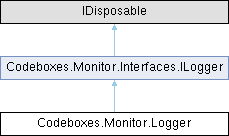
This class can be used as a simple Logger. It provides the ImpactLevels as functions and takes the related source as a constructor argument. Best practice is, to use it as followed:
More...
|
| | Logger (object source, [AllowNull] string monitorParty=null) |
| | Constructs a new Logger instance, which can be used for shorter log calls by giving a function for each ImpactLevel.
|
| |
| void | Dispose () |
| | Destroys this instance, so it can't be used afterwards any longer.
|
| |
| void | Info (string message, [AllowNull] string details=null, [AllowNull] ImpactTopic topic=null) |
| | Calls the Log function at the Monitor with ImpactLevel.INFO, the source from the constructor and the arguments, given by this function. This will not work, if this instance was disposed.
|
| |
| void | Debug (string message, [AllowNull] string details=null, [AllowNull] ImpactTopic topic=null) |
| | Calls the Log function at the Monitor with ImpactLevel.DEBUG, the source from the constructor and the arguments, given by this function. This will not work, if this instance was disposed.
|
| |
| void | Warn (string message, [AllowNull] string details=null, [AllowNull] ImpactTopic topic=null) |
| | Calls the Log function at the Monitor with ImpactLevel.WARN, the source from the constructor and the arguments, given by this function. This will not work, if this instance was disposed.
|
| |
| void | Error (string message, [AllowNull] string details=null, [AllowNull] ImpactTopic topic=null) |
| | Calls the Log function at the Monitor with ImpactLevel.ERROR, the source from the constructor and the arguments, given by this function. This will not work, if this instance was disposed.
|
| |
| void | Fatal (string message, [AllowNull] string details=null, [AllowNull] ImpactTopic topic=null) |
| | Calls the Log function at the Monitor with ImpactLevel.FATAL, the source from the constructor and the arguments, given by this function. This will not work, if this instance was disposed.
|
| |
| void | Log (ImpactLevel level, string message, [AllowNull] object source=null, [AllowNull] string details=null, [AllowNull] ImpactTopic topic=null) |
| | Adds a log entry to the given monitor, given by the monitorParty at the constructor. The Source of this will ignored by this call.
|
| |
|
| String | Source [get] |
| | this is the source, which is passed to each log call of this instance, which is given by the constructor
|
| |
| Monitor | Monitor [get] |
| | this is the monitor, which is used at every log call; the monitorParty, which is given by the constructor, decides which instance of the Monitor is used;
|
| |
This class can be used as a simple Logger. It provides the ImpactLevels as functions and takes the related source as a constructor argument.
Best practice is, to use it as followed:
class MyClass
{
private static Logger LOG =
new Logger(MyClass,
"myMonitorParty");
...
void MyFunc (args)
{
...
LOG.warn(
"my message",
"the details (stacktrace)",
ImpactTopic.SOME);
LOG.info("my message");
}
}
This class is used at log and alert factories by the Monitor to determine the impact topic of the add...
Definition ImpactTopic.cs:17
This class can be used as a simple Logger. It provides the ImpactLevels as functions and takes the re...
Definition Logger.cs:35
In case you have created or using a custom ImpactLevel, you should extend this class and add the related function by your own, due to that we "just" give the call to the Monitor instance.
◆ Logger()
| Codeboxes.Monitor.Logger.Logger |
( |
object | source, |
|
|
[AllowNull] string | monitorParty = null ) |
|
inline |
Constructs a new Logger instance, which can be used for shorter log calls by giving a function for each ImpactLevel.
- Parameters
-
| source | the source, which will be passed to each log call of this instance |
| monitorParty | the monitor instance key, which will be used for each log call of this instance |
◆ Debug()
| void Codeboxes.Monitor.Logger.Debug |
( |
string | message, |
|
|
[AllowNull] string | details = null, |
|
|
[AllowNull] ImpactTopic | topic = null ) |
|
inline |
Calls the Log function at the Monitor with ImpactLevel.DEBUG, the source from the constructor and the arguments, given by this function. This will not work, if this instance was disposed.
- Parameters
-
| message | the log message (or a short info) |
| details | the stacktrace of an error or the long info |
| topic | the topic of the log |
◆ Dispose()
| void Codeboxes.Monitor.Logger.Dispose |
( |
| ) |
|
|
inline |
Destroys this instance, so it can't be used afterwards any longer.
◆ Error()
| void Codeboxes.Monitor.Logger.Error |
( |
string | message, |
|
|
[AllowNull] string | details = null, |
|
|
[AllowNull] ImpactTopic | topic = null ) |
|
inline |
Calls the Log function at the Monitor with ImpactLevel.ERROR, the source from the constructor and the arguments, given by this function. This will not work, if this instance was disposed.
- Parameters
-
| message | the log message (or a short info) |
| details | the stacktrace of an error or the long info |
| topic | the topic of the log |
◆ Fatal()
| void Codeboxes.Monitor.Logger.Fatal |
( |
string | message, |
|
|
[AllowNull] string | details = null, |
|
|
[AllowNull] ImpactTopic | topic = null ) |
|
inline |
Calls the Log function at the Monitor with ImpactLevel.FATAL, the source from the constructor and the arguments, given by this function. This will not work, if this instance was disposed.
- Parameters
-
| message | the log message (or a short info) |
| details | the stacktrace of an error or the long info |
| topic | the topic of the log |
◆ Info()
| void Codeboxes.Monitor.Logger.Info |
( |
string | message, |
|
|
[AllowNull] string | details = null, |
|
|
[AllowNull] ImpactTopic | topic = null ) |
|
inline |
Calls the Log function at the Monitor with ImpactLevel.INFO, the source from the constructor and the arguments, given by this function. This will not work, if this instance was disposed.
- Parameters
-
| message | the log message (or a short info) |
| details | the stacktrace of an error or the long info |
| topic | the topic of the log |
◆ Log()
| void Codeboxes.Monitor.Logger.Log |
( |
ImpactLevel | level, |
|
|
string | message, |
|
|
[AllowNull] object | source = null, |
|
|
[AllowNull] string | details = null, |
|
|
[AllowNull] ImpactTopic | topic = null ) |
|
inline |
Adds a log entry to the given monitor, given by the monitorParty at the constructor. The Source of this will ignored by this call.
- Parameters
-
| level | the level of the log entry |
| message | the message of the log entry aka the short info |
| source | the source of the log entry |
| details | the stacktrace of an error or the long info |
| topic | the topic of the log entry |
Implements Codeboxes.Monitor.Interfaces.ILogger.
◆ Warn()
| void Codeboxes.Monitor.Logger.Warn |
( |
string | message, |
|
|
[AllowNull] string | details = null, |
|
|
[AllowNull] ImpactTopic | topic = null ) |
|
inline |
Calls the Log function at the Monitor with ImpactLevel.WARN, the source from the constructor and the arguments, given by this function. This will not work, if this instance was disposed.
- Parameters
-
| message | the log message (or a short info) |
| details | the stacktrace of an error or the long info |
| topic | the topic of the log |
◆ Monitor
| Monitor Codeboxes.Monitor.Logger.Monitor |
|
get |
this is the monitor, which is used at every log call; the monitorParty, which is given by the constructor, decides which instance of the Monitor is used;
◆ Source
| String Codeboxes.Monitor.Logger.Source |
|
get |
this is the source, which is passed to each log call of this instance, which is given by the constructor
The documentation for this class was generated from the following file:

 Public Member Functions inherited from Codeboxes.Monitor.Interfaces.ILogger
 1.12.0